A Google Workspace account can be secure at the password level and still leak data through third-party app permissions. OAuth apps are convenient because users do not share passwords, but they can still grant access to Gmail, Drive, Calendar, Contacts, and user profile data.
A marketing employee tests a Chrome extension that summarizes Gmail threads. The password is safe, MFA is on, but the extension receives mailbox access. The security issue is not login theft; it is approved access that nobody tracks.
This guide is written for small business owners, solo founders, agencies, freelancers, and content-site operators who need a practical way to make the decision without creating an enterprise security department.
Quick Answer
If you only take one thing from this guide, take this: do not judge this topic by whether the tool, plugin, account, or workflow is popular. Judge it by what it can access, what can go wrong, who owns the decision, and how quickly you can reverse the change.
For a small business, a strong setup is usually simple:
- one accountable owner
- limited permissions
- written settings
- tested recovery
- monthly review
- no permanent access without a reason
That sounds basic, but most real failures happen because one of these pieces is missing.
Quick Decision Framework
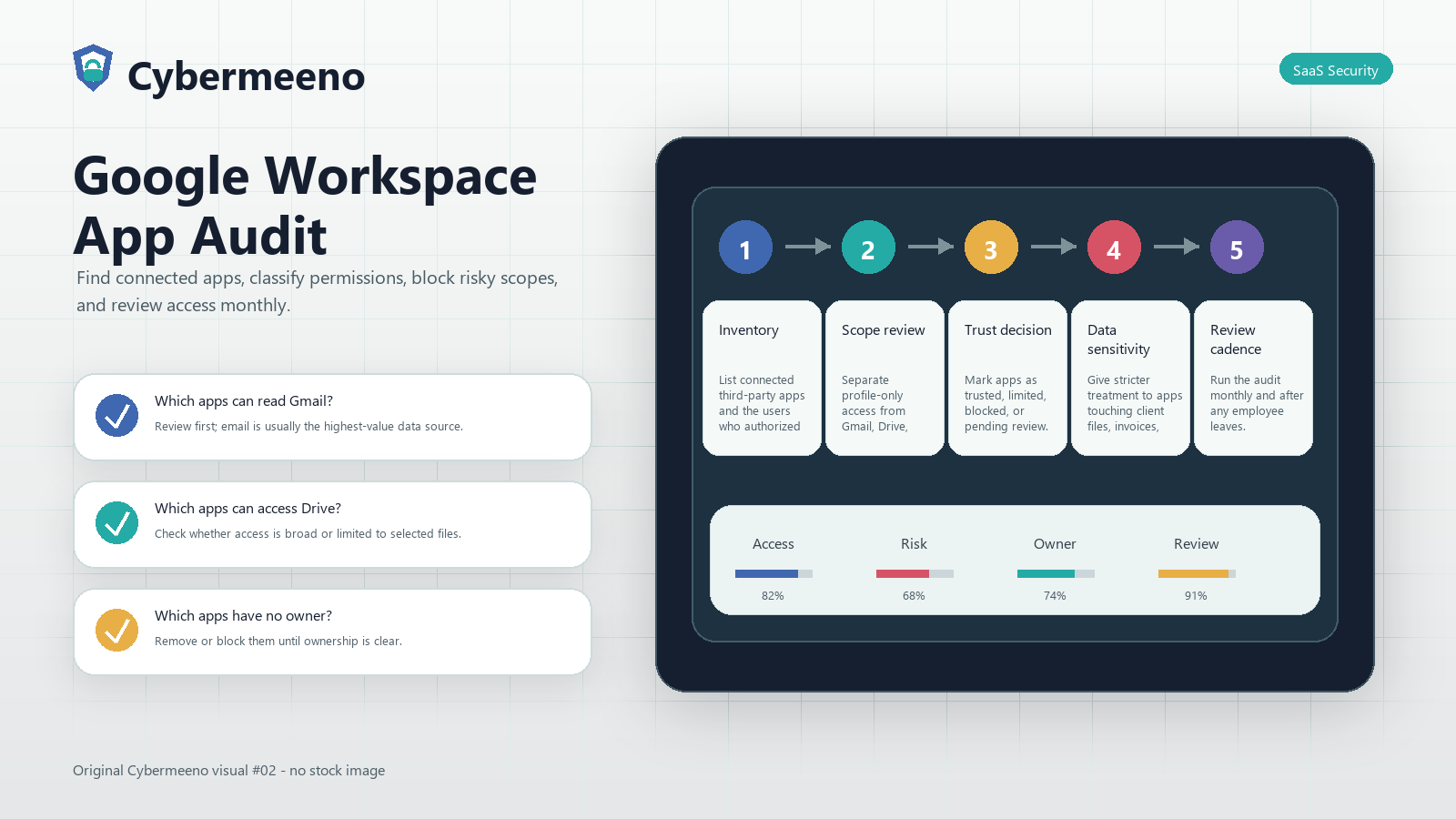
| Area | What to do |
|---|---|
| Inventory | List connected third-party apps and the users who authorized them. |
| Scope review | Separate profile-only access from Gmail, Drive, Calendar, Contacts, and admin-level access. |
| Trust decision | Mark apps as trusted, limited, blocked, or pending review. |
| Data sensitivity | Give stricter treatment to apps touching client files, invoices, legal records, support tickets, or email. |
| Review cadence | Run the audit monthly and after any employee leaves. |
The point is not to make the process slow. The point is to make the risk visible before a rushed approval becomes permanent access.
Weak Setup vs Strong Setup
| Area | Weak setup | Strong setup | Review question |
|---|---|---|---|
| Inventory | Thinking MFA protects against every third-party app risk. | List connected third-party apps and the users who authorized them. Review first; email is usually the highest-value data source. | Which apps can read Gmail? |
| Scope review | Letting every user approve any app that asks for Workspace data. | Separate profile-only access from Gmail, Drive, Calendar, Contacts, and admin-level access. Check whether access is broad or limited to selected files. | Which apps can access Drive? |
| Trust decision | Ignoring apps connected during free trials. | Mark apps as trusted, limited, blocked, or pending review. Remove or block them until ownership is clear. | Which apps have no owner? |
| Data sensitivity | Treating browser extensions as harmless productivity tools. | Give stricter treatment to apps touching client files, invoices, legal records, support tickets, or email. Revoke access during offboarding. | Which apps are used by ex-employees? |
| Review cadence | Thinking MFA protects against every third-party app risk. | Run the audit monthly and after any employee leaves. Review first; email is usually the highest-value data source. | Which apps can read Gmail? |
This table is useful because it turns vague advice into a decision. If your current setup looks closer to the weak column, do not treat that as failure. Treat it as your next fix list.
Why This Matters in 2026
Small teams now run on connected tools. A blog is connected to WordPress, analytics, email, AI writing tools, cloud storage, password managers, payment platforms, social schedulers, and sometimes CRMs. Every connection creates a permission trail.
The best security programs for small businesses are not built from expensive dashboards first. They are built from clear ownership, limited access, recoverable systems, and a habit of reviewing tools before they touch sensitive data.
For this topic, the practical question is:
Can we explain what has access, why it has access, who owns it, and how we remove it?
If the answer is no, the setup is not ready yet.
Operator Case Study: How This Fails in a Real Small Business
A marketing employee tests a Chrome extension that summarizes Gmail threads. The password is safe, MFA is on, but the extension receives mailbox access. The security issue is not login theft; it is approved access that nobody tracks.
The expensive part is rarely the first click. The expensive part is the quiet period after the click, when the access stays active, the data keeps moving, and nobody owns the decision anymore.
Here is how a careful operator would handle the same situation:
- Start with the business reason: List connected third-party apps and the users who authorized them.
- Run the first review question: Which apps can read Gmail? Review first; email is usually the highest-value data source.
- Run the second review question: Which apps can access Drive? Check whether access is broad or limited to selected files.
- Decide whether to approve, limit, sandbox, or reject.
- Put a review date on the decision so it does not become permanent by accident.
This is the difference between security theater and operational security. Security theater creates rules nobody follows. Operational security creates small habits that keep working when the site grows, the team changes, or a contractor leaves.
Deep Review Matrix
Use this section when the first-pass checklist is not enough. It gives you the extra detail that separates a surface-level setup from one that can survive real operations.
| Area | What to inspect | Question to ask | Bad sign | Next action |
|---|---|---|---|---|
| Inventory | List connected third-party apps and the users who authorized them. | Which apps can read Gmail? | Thinking MFA protects against every third-party app risk. | Review first; email is usually the highest-value data source. |
| Scope review | Separate profile-only access from Gmail, Drive, Calendar, Contacts, and admin-level access. | Which apps can access Drive? | Letting every user approve any app that asks for Workspace data. | Check whether access is broad or limited to selected files. |
| Trust decision | Mark apps as trusted, limited, blocked, or pending review. | Which apps have no owner? | Ignoring apps connected during free trials. | Remove or block them until ownership is clear. |
| Data sensitivity | Give stricter treatment to apps touching client files, invoices, legal records, support tickets, or email. | Which apps are used by ex-employees? | Treating browser extensions as harmless productivity tools. | Revoke access during offboarding. |
| Review cadence | Run the audit monthly and after any employee leaves. | Which apps can read Gmail? | Thinking MFA protects against every third-party app risk. | Review first; email is usually the highest-value data source. |
Decision Rules You Can Copy
Use these rules when the team is unsure whether to approve, delay, or reject a change.
| Situation | Decision |
|---|---|
| The business reason is unclear | Delay approval until the owner can explain the workflow and expected benefit |
| The setup touches sensitive customer, payment, legal, health, or financial data | Require stricter review and consider professional help |
| The tool or workflow has broad access but no owner | Reject or sandbox until ownership is assigned |
| The vendor or plugin cannot explain retention, deletion, or access controls | Do not use it with confidential data |
| The change is useful but risky | Approve with limits, a review date, and documented rollback steps |
| The team cannot test recovery or removal | Do not treat the setup as production-ready |
For this article, pay special attention to inventory, scope review, and trust decision. Those are the points where small teams usually move too fast.
Step-by-Step Playbook
1. Create an app-access baseline
Export or document the apps currently connected to business accounts. Do not start by blocking everything; first understand what the team actually uses.
Implementation detail: Use one record for the decision: owner, date, scope, evidence, and next review. A simple row in a spreadsheet is enough if it is maintained.
The check to run here is: Which apps can read Gmail? Review first; email is usually the highest-value data source.
A weak version of this step is: Thinking MFA protects against every third-party app risk. The strong version creates a paper trail a future admin can understand.
2. Sort apps by data touched
Gmail and Drive should be treated as high-impact systems. A note-taking app with calendar read access is not the same as a tool that can download files.
Implementation detail: Open the real settings screen and capture what is enabled. Do not rely on memory or vendor marketing copy.
The check to run here is: Which apps can access Drive? Check whether access is broad or limited to selected files.
A weak version of this step is: Letting every user approve any app that asks for Workspace data. The strong version shows the exact setting, not just the intention.
3. Block unknown high-scope apps
If nobody owns the app and it can access sensitive data, block it until someone justifies the business use.
Implementation detail: Test with a low-risk account or folder first. If the workflow cannot be proven with test data, it is not ready for sensitive data.
The check to run here is: Which apps have no owner? Remove or block them until ownership is clear.
A weak version of this step is: Ignoring apps connected during free trials. The strong version proves usefulness before trusting production data.
4. Limit new app approvals
Require admin review for apps requesting sensitive scopes. This prevents one-click approvals from becoming long-term exposure.
Implementation detail: Prefer the narrowest access that still lets the work happen. Broad access should be the exception, not the starting point.
The check to run here is: Which apps are used by ex-employees? Revoke access during offboarding.
A weak version of this step is: Treating browser extensions as harmless productivity tools. The strong version limits blast radius if the tool or account is later compromised.
5. Document exceptions
If a risky app is approved, record the owner, reason, permissions, and review date.
Implementation detail: Put removal on the calendar. Access that never expires becomes part of the attack surface.
The check to run here is: Which apps can read Gmail? Review first; email is usually the highest-value data source.
A weak version of this step is: Thinking MFA protects against every third-party app risk. The strong version includes cleanup, review, and an owner.
What to Check Before You Approve or Change Anything
| Check | Why it matters |
|---|---|
| Which apps can read Gmail? | Review first; email is usually the highest-value data source. |
| Which apps can access Drive? | Check whether access is broad or limited to selected files. |
| Which apps have no owner? | Remove or block them until ownership is clear. |
| Which apps are used by ex-employees? | Revoke access during offboarding. |
Common Mistakes
- Thinking MFA protects against every third-party app risk.
- Letting every user approve any app that asks for Workspace data.
- Ignoring apps connected during free trials.
- Treating browser extensions as harmless productivity tools.
These mistakes are common because they feel small at the time. The risk appears later when the site grows, the team changes, or a tool is forgotten.
Owner Responsibility Map
| Role | Responsibility | What they should not own alone |
|---|---|---|
| Site owner / founder | Final decision, risk acceptance, budget, and review cadence for inventory | Technical settings they do not understand without help |
| Admin / developer | Configuration, access controls, logs, backups, and technical evidence for scope review | Business approval without owner sign-off |
| Writer / operator | Day-to-day workflow, draft usage, screenshots, publishing notes, and reporting issues | Admin permissions or sensitive data approvals |
| Contractor / vendor | Only the task-specific access needed to complete work | Permanent access, shared owner passwords, or untracked API keys |
| Future reviewer | Check whether the control still works after 30-90 days | Assuming old decisions are still correct |
The most important line in this table is the final reviewer. Small sites fail quietly when old decisions never get rechecked. A tool that was safe during a trial may become risky after the team adds customer data, contractors, automations, or billing access.
30-Day Implementation Plan
Week 1: Inventory and Baseline
List the accounts, tools, users, settings, connected apps, files, and workflows that matter for this topic. Do not change everything immediately. First create a baseline so you know what exists today.
For a small team, the baseline can be a spreadsheet with the owner, tool name, access level, data touched, and next review date. The purpose is visibility. You cannot secure access that nobody remembers granting.
Week 2: Reduce the Obvious Risk
Fix the highest-impact issues first: shared admin accounts, missing MFA, unknown connected apps, weak recovery settings, unused plugins, untested backups, broad file sharing, or tools with no owner.
Do not spend the first week chasing perfect policy language. Remove the easy exposure that could create real damage.
Week 3: Document the Repeatable Process
Turn the decision into a repeatable workflow. Write down who approves changes, what evidence is checked, what data is allowed, and when the setup must be reviewed again.
The process should be short enough that the team will use it. A one-page checklist used every month is better than a long policy nobody opens.
Week 4: Review and Improve
Check whether the control actually changed behavior. Did people stop sharing passwords in chat? Did old tools get removed? Are backups restorable? Are app permissions reviewed before approval?
If the answer is unclear, simplify the process and assign one owner.
Evidence to Keep
Keep lightweight evidence for important security decisions. This helps during migrations, incidents, contractor changes, and future audits.
- screenshot of important settings
- approval note or decision record
- owner name and review date
- backup or export location
- list of users with access
- source links used for the decision
- notes from restore tests, access reviews, or vendor checks
Evidence does not need to be fancy. It needs to be findable when something breaks.
For this specific topic, keep:
- screenshot or export showing the current state of inventory
- screenshot or export showing the current state of scope review
- screenshot or export showing the current state of trust decision
- screenshot or export showing the current state of data sensitivity
Metrics Worth Tracking
Track a few numbers monthly:
- number of admin accounts
- number of unused users removed
- number of high-risk apps or plugins reviewed
- number of backups successfully tested
- number of tools without owners
- number of unresolved security tasks older than 30 days
These metrics make security operational. If a number never improves, the process is probably too vague.
When to Get Professional Help
Get qualified help if this topic touches regulated data, legal obligations, payment data, healthcare information, financial records, customer breach notification, active compromise, ransomware, or systems that cannot afford downtime.
Cybermeeno content is designed to help small businesses make better first decisions, but some situations need legal, compliance, or professional security support.